
.png)


Key Takeaways:
- A slow booking day does not automatically mean a slow month. Booking window shifts often change when demand arrives, which can make pacing look weaker before bookings catch up.
- Pickup is the clearest signal for real booking momentum because it shows what has been added recently, while occupancy and pacing only show your current position.
- The most common mistakes come from comparing uneven time periods, reacting before your market’s booking window opens, and treating delayed demand like lost demand.
Checking your dashboard every morning can make performance look worse than it is. One slow booking day can make it seem like something is wrong with your pricing, listings, or strategy. Often, nothing has actually changed.
This is the anxiety loop many property management teams fall into. A slow booking day triggers immediate reactions: lowering rates, questioning positioning, or making unnecessary changes. But daily data, in isolation, is noisy, and reacting to it often does more harm than good.
Understanding when demand typically arrives, and whether bookings are building, is what separates reactive decisions from confident ones.
For instance, after the release of the FIFA World Cup 2026 schedule, urban markets like Boston saw the booking window extend to 121.63 days, far beyond the typical 25–35-day range, showing that demand timing can shift without reducing total demand.
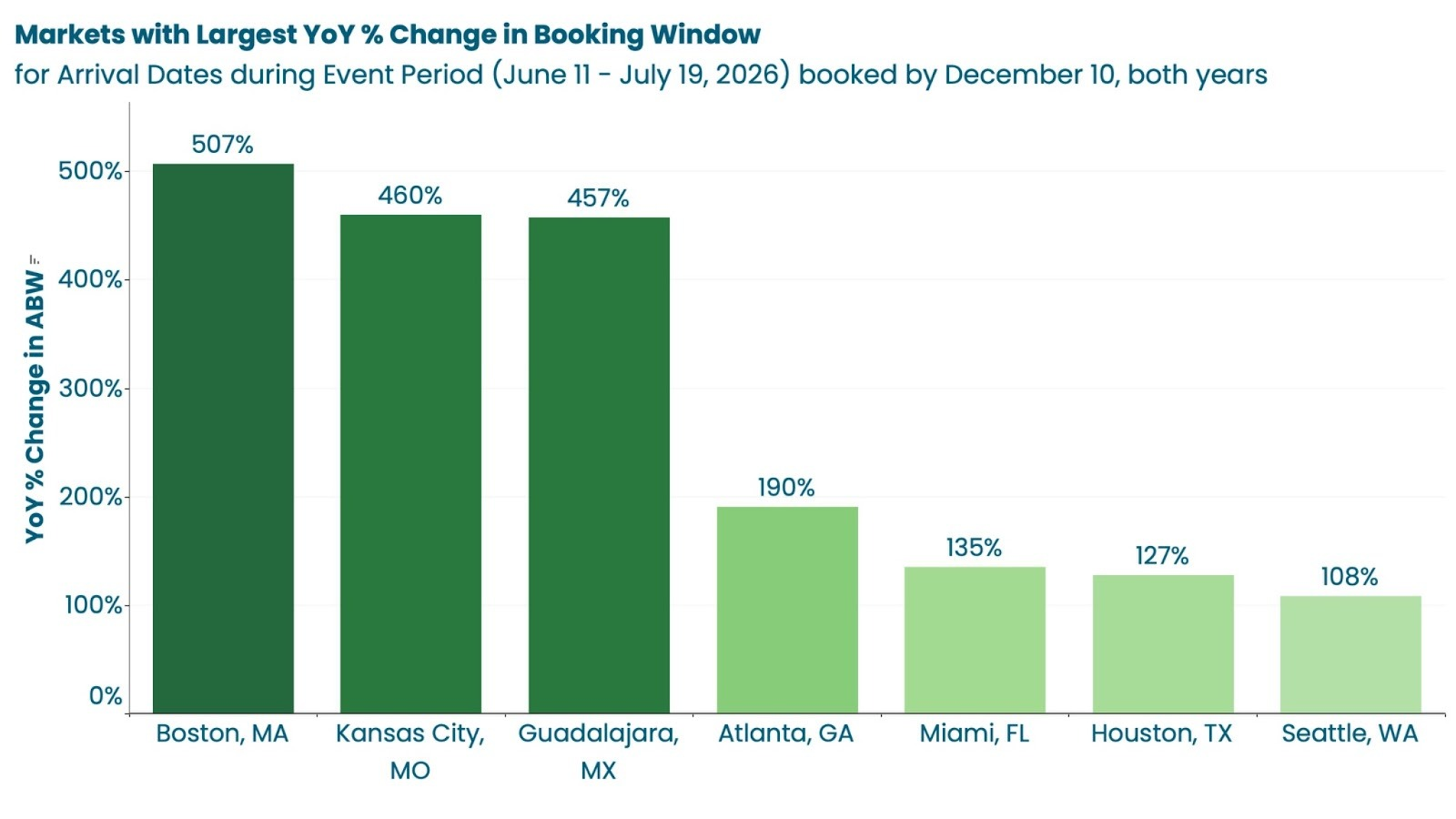
In this article, we’ll review how to read a pickup report, how booking windows shape pacing, and how to interpret signals correctly, so you know when a slow day is completely normal.
Understanding Booking Windows
Definition and Why It Shifts Year Over Year
The booking window measures the average number of days between the reservation and arrival dates. It’s one of the most important (and most misunderstood) indicators of demand timing in vacation rental performance.
The tricky part is that booking windows are not fixed; they expand and contract based on traveler confidence, macroeconomic conditions, and market-specific dynamics such as events, seasonality, and airlift.
A shorter booking window in the current year compared to the previous year doesn’t mean demand is weaker; it can mean that the demand is arriving later.
For instance, before the America 250 celebrations, national booking windows average 331 days, with destinations like Washington, D.C., extending even further as travelers lock in early for high-demand events.
At the same time, other urban markets continue to operate on much shorter windows outside of event-driven demand. This is why comparing year-over-year pacing without booking-window context can lead to incorrect conclusions.
KeyData can help you identify these shifts using real reservation data, giving you and your teams visibility into evolving booking behavior.
Why a Shrinking Booking Window Isn't a Red Flag
When booking windows compress, forward pacing will almost always appear softer than the prior year. But that softness is a timing effect, not a demand signal. The bookings haven’t arrived yet.
However, this is where many property management teams take reactive measures. Reacting to early pacing gaps by dropping rates or loosening restrictions too soon can unnecessarily erode revenue, especially during peak periods, when demand is likely to materialize closer to arrival.
The real question isn’t “Why is pacing down?”, it’s “Is our booking window consistent with last year?” or “Has the demand timing shifted later?”
If the window has shifted, then slower pacing is expected and often temporary.
Why Pickup Matters More than Occupancy
Pickup Shows Momentum, Totals Don't
Total occupancy and pacing tell you where you stand today. Pickup reflects recent booking activity, making it one of the clearest indicators of current demand trends..
Pickup measures the number of reservations added over a recent period (typically 7, 14, or 30 days) for future arrival dates. It answers a critical question: “Are bookings coming in, or not?”
This is why a property or even an entire portfolio can appear behind on occupancy and still be in a strong position. If pickup is healthy, demand is building. It just hasn’t fully translated into forward occupancy yet.
14-Day vs. 30-Day Pickup: Which to Use
Not all pickup windows serve the same purpose. The timeframe you analyze determines whether you’re looking at short-term urgency or overall trend stability.
- 14-day pickup captures recent momentum and is best for close-in decision making, especially for near-term availability and tactical adjustments.
- 30-day pickup smooths out short-term noise and provides a clearer view of overall booking health across a broader window.
Combined, the 30-day view tells you if demand is building consistently, while the 14-day view highlights whether that momentum is accelerating or slowing in real time.
ProData’s pacing and pickup reports allow you to analyze both windows at the portfolio and unit level using real reservation data, helping you interpret trends accurately without relying on assumptions or incomplete signals.
Common Pickup Reporting Mistakes
Comparing Today to a Full Prior-Year Month
One of the most common mistakes is comparing a single day or a quiet week to an entire prior-year month. This distorts the view of performance and almost always makes current pacing look worse than it actually is.
The only valid comparison is to evaluate equivalent windows, such as the last 14 days this year versus the same 14-day period last year. Without alignment, you’re not measuring performance; you’re measuring timing differences.
With KeyData, you can standardize such comparisons using consistent timeframes, helping your teams avoid false conclusions driven by uneven data slices.
Reacting Before Your Market's Booking Window Opens
Every market has a predictable window where bookings begin to accelerate for a given arrival period. Acting before that window opens, by lowering rates or adjusting restrictions, is effectively reacting to silence, not to data.
If your market’s booking window has moved, early pacing will look soft by definition, and acting too soon in such an instance doesn’t help you capture demand; it discounts ahead of it.
Confusing Delayed Demand With Lost Demand
Delayed demand and lost demand look identical on a pacing chart. Both show lower forward occupancy compared to prior periods. The difference is that delayed demand eventually shows up, and pickup reveals the difference.
A compressed booking window simply means bookings are happening closer to arrival. The demand hasn’t disappeared; it just hasn’t materialized yet. Without tracking pickup trends over time, it’s easy to misinterpret that delay as a performance issue.
How Do You Use Pickup to Stay Calm?
What Healthy Pickup Looks Like
Healthy pickup doesn’t mean every day is strong; it simply means momentum is consistent over the right timeframe. When pickup is tracking in line with or ahead of the same period last year, it’s a strong signal that demand is building as expected, even if forward occupancy hasn’t fully caught up yet.
When both 14-day and 30-day pickup trends move in the same direction without major spikes or drop-offs, it suggests stable booking behavior rather than volatility. More importantly, arrival dates should fill a pattern that matches your market’s historical booking curve, not an arbitrary daily expectation.
When Flat Pickup Is Normal
Flat pickup is often misread as a warning sign, but in many cases, it’s an expected occurrence. Outside peak booking periods, demand tends to move slowly, especially during shoulder seasons or post-holiday windows when traveler urgency is lower.
A quiet day doesn’t indicate a weak month ahead. It often just reflects where you are in the booking cycle. Interpreting flat pickup correctly requires understanding when your market typically “turns on,” not expecting constant activity.
When Declining Pickup Is a Red Flag
While flat pickup can be normal, a consistent decline requires attention. It’s crucial to look for patterns, not isolated slow days, but sustained downward trends across multiple timeframes.
A red flag typically includes a combination of signals:
- Pickup is declining while comparable properties and market benchmarks are gaining bookings
- Close-in availability remains high on dates that historically would have filled by now
- Rather than a single quiet week, both 14-day and 30-day pickups are trending downward
How Do You Turn Pickup Insights Into Strategy?
Adjust Weekdays Before Weekends
When pickup signals that action is needed, where you make the adjustment is just as important as when you act.
Weekday demand is typically more price-sensitive and slower to fill, making it the right place to start before touching weekend rates.
Weekend demand, by contrast, is far more resilient. Discounting high-demand nights too early can erode RevPAR without meaningfully improving occupancy. A more effective approach is to use pickup trends to identify softness in weekday performance first, preserving weekend pricing strength for as long as demand supports it.
Preserve Rate Integrity
Pickup data is not just a signal to act; it’s a signal for timing. Acting too early, especially in response to soft pacing caused by a shifting booking window, can lower your rate floor for peak periods and reduce overall revenue potential.
Set rate boundaries in advance, then use pickup trends to guide movement within that range. This ensures adjustments are measured and intentional, rather than reactive.
Let Pickup Guide Timing, Not Fear
One of the most effective ways to reduce premature adjustments is to change how often you review performance.
Daily dashboard checks tend to amplify short-term noise, making normal fluctuations feel like problems that need immediate action.
Instead, establish a consistent weekly review cadence focused on 14-day and 30-day pickup trends. This allows patterns to emerge clearly, helping you distinguish between temporary slow periods and meaningful shifts in demand.
With ProData, you can access pacing details and leadership reports, giving your team a structured view of pickup across both timeframes.
The Signal Is There — Are You Reading It?
Data doesn’t eliminate uncertainty; it helps you understand when to wait and when to act.
Booking windows explain timing, pacing shows position, but pickup is the clearest signal of what’s actually happening in your market.
The challenge isn’t access to data, but its interpretation.
Performance can look weak in the short term while still trending exactly as it should. The difference comes down to whether you’re reading the timing right or making unnecessary pricing adjustments..
KeyData helps you access accurate, real-time performance data and market context, equipping you with the information you need to make informed decisions.
Before you adjust your pricing strategy, take a step back and look at what pickup is telling you, before making your next move.