



Key Takeaways
- Choosing the right vacation rental software begins with auditing your operations—identifying revenue leaks, time drains, and scalability gaps before exploring tools.
- Define clear must-have vs nice-to-have features based on your business model to avoid feature overload.
- Use structured research and focused demos to compare platforms realistically—test with your own data, workflows, and cost scenarios.
- Always calculate the actual total cost, including hidden expenses such as training, integration, and productivity loss during the transition.
- Follow a clear roadmap to make your decision with confidence—audit, define, shortlist, test, and validate performance before committing to a long-term solution.
The Software Decision That Makes or Breaks Success
Choosing the right software can feel like a high-stakes gamble. When you own a property management company, you’re juggling dozens of tools, promises, and demos, and one misstep can cost you time, revenue, and trust.
More options make it harder to choose, not easier. Each platform pitches scalability, custom dashboards, or automation, but how do you know which features actually deliver? And once locked in, switching platforms becomes very expensive, messy, and disruptive.
So the real question isn’t which software looks best on a spec sheet; it’s how to cut through all the marketing hype and find what actually suits your needs.
In this article, we’ll review a step-by-step framework to audit, evaluate, demo, and decide on the best vacation rental software for your property management company—the kind that fits your operational requirements and supports revenue growth.
Key Steps to Finding the Best Vacation Rental Software
Step 1: Audit Your Current Operations
Before seeking a solution, you must understand where your business is losing money. Audit your current operations to make every subsequent decision easier and smarter.
- Identify The Pain Points
- Revenue leaks are caused by manual pricing errors, double bookings, and availability gaps that result in unsold nights.
- Time drains caused by staff stuck in repetitive tasks (e.g., manual messaging, calendar syncs)
- Processes or tools that break when you try to scale.
- Calculate Your Current Software Cost
- Staff hours spent on manual tasks x hourly rate; even just five hours per property per week adds up.
- Lost revenue due to inefficiencies such as nights unsold, pricing mistakes, and underoptimized listings.
- Negative reviews or slow responses can impact loyalty and repeat bookings.
Step 2: Define Requirements
Once you understand what’s slowing down your business, the next essential step is to clearly define your requirements; distinguishing between what you must have and what’s nice to have.
This ensures that any software you shortlist aligns directly with your business model, rather than the platform’s sales pitch.
- Must-haves are deal breakers. If a platform lacks these, move on.
- Nice-to-haves are valuable enhancements but not core to your operations or growth strategy.
Model-Based Core Requirements
Tailor your must-have list based on your company’s role in the short-term rental ecosystem:
- Self Managed/Owner Operated
- Guest automation and messaging
- Direct booking engine with website support
- Basic channel manager and calendar sync
- Built-in marketing tools (promos, email campaigns)
- Full-service PMC
- Owner portal and reporting
- Maintenance and task workflows
- Accounting and financial reporting
- Multi-unit team roles and permissions
- Investment Focused/Portfolio Manager
- Performance analytics and benchmarking
- Market intelligence and comp sets
- ROI tracking and forecast modelling
- Unit-level and portfolio-level dashboards
Your requirements should reflect how you operate, not how a vendor wants you to use their software.
Practical Constraints to Consider
Even with a perfect requirements list, certain constraints can force trade-offs. So always be realistic upfront:
- Technical Comfort: Avoid platforms that do not suit your team.
- Implementation Timeline: Do you need to go live in 30 days or 6 months?
- Total Budget: Understand the costs and expenses involved, including training, onboarding, and integration.
- Integration Requirements: Your new software must work with your PMS, accounting, and other existing tools.
Step 3: Research and Create Your Shortlist
You can’t try every solution on the market. The secret is eliminating bad fits and systematically focusing on the relevant ones.
Best Research Sources
- Connect with your peers in the same industry to gather information on the tools and software they’re using or check online for reviews and pain points from property managers.
- Talk to property managers operating in your or neighboring cities with a similar portfolio to gain deeper insights.
- Compare the solutions online with comparison sites, tech review journals, or hospitality technology publications.
Quick Screening Criteria
Cross out the tools/solutions if:
- They don’t support your unit/property types or your markets.
- The total cost (base + setup + integrations) exceeds your budget levels.
- There is repetitive and negative feedback from similar operators.
- It has poor integration capabilities, a dated UI, or weak API support.
Step 4: Conduct Meaningful Software Demos
Demos are often a part of a sales pitch. You need to be able to test how the software really behaves and performs under your workflow.
Demo Preparation
- Bring real property listings and use cases from your portfolio. Don’t let the vendor demo generic examples.
- Prepare workflow challenges for them to solve (e.g., owner report generation, maintenance dispatch, rate update across 50 units).
- Instead of a feature tour, ask them to walk through your daily operations to see how your real tasks flow through the systems.
Critical Questions to Ask
- Implementation
- What’s a realistic go-live timeline for a portfolio of my size?
- What data will we lose or transform during migration?
- How many hours of team training should we budget for?
- Support
- What implementation support is actually included (and what costs extra)?
- How do we get help when something breaks—live chat, ticket, phone?
- Costs
- What additional year-one costs should I expect (integrations, custom setup, add-ons)?
- How does your pricing scale as our portfolio grows?
Step 5: Calculate True Total Cost
To avoid unnecessary surprises later, take time to map out both direct and hidden costs. This clarity can help you make a financially safe decision.
Direct Costs
- Monthly subscription/licensing fees
- Setup and implementation charges (uploading data, configuration workflows)
- Training and onboarding for your staff
- Integration development (connecting to your PMS, accounting, etc.)
Hidden Costs
- Reduced Productivity During Transition: Digital transformation can result in up to 45% of total software adoption costs being lost productivity, training time, and morale impacts.
- Third-Party App Connections: Maintaining plugins, connectors, or middleware that bridge systems that are not directly integrated may incur additional costs.
- Ongoing Training: As your team expands or software updates are rolled out, continuous training becomes essential to maintain efficiency and ensure high-quality adoption.
ROI Calculation Framework
To justify the investment, run a simple ROI calculation model with realistic assumptions:
- Hours Saved/Week x Team Cost: If a system saves 15 hours per week and your average staff cost is $30/h, that’s $450/week in value.
- Revenue Gains From Better Pricing/Fewer Gaps: Even a 1-2% increase in occupancy or ADR can translate to sizable revenue uplift.
- Cost Avoidance From Fewer Errors: Less manual correction, fewer double bookings, fewer guest complaints impacting reviews.
With these numbers, you can forecast how long it takes to break even and when you’ll start generating net returns.
Step 6: Test Before You Commit
Never believe the pitch alone; hands-on use is the real proof of value. Use a trial or pilot to stress-test the system with your actual workflows.
Negotiate a Trial
- Ask for a free trial that includes the key features you’ll rely on (reporting, owner portals, integrations).
- Where free trials fall short, negotiate a paid pilot with full platform access for your team.
- Negotiate and request a money-back guarantee period so you can step back if the product fails to meet expectations.
Trial Success Criteria
During the trial, use precise metrics to see whether the tool will actually work for your business:
- Note how long it takes to complete daily tasks, such as updating rates across 50 units and generating homeowner statements.
- Check how many users can use it without additional guidance or support.
- Track crash logs, lag time, and downtime under heavy load to check the performance and note the system's reliability.
- Verify that it integrates seamlessly with your existing PMS, accounting, or reporting tools.
Step 7: Make Your Decision Confidently
The final step is to move from analysis to action, transforming insights into a confident decision that will set your team up for long-term success.
Decision Framework
Use both logic and instincts when making your choice. A simple weighted scoring system can remove bias while confirming alignment.
- Score on Weighted Criteria: Rank features, ease of use, integration quality, and support on a 1–5 scale. Assign weights based on what matters the most to your business.
- Trust Your Gut: Which platform feels most natural for your team? Smooth workflows now can avoid frustration later.
- Evaluate Vendor Partnerships: Analyze which vendor properly understands your business goals. Long-term success often depends on the relationship, not just the tool.
Implementation Success Plan
Once you’ve chosen your platform, plan implementation like a project, not an afterthought.
- Clean Existing Data Before Migration: Eliminate duplicates, verify ownership, and archive outdated records to ensure a smooth import.
- Plan Team Communication and Training: Schedule sessions before going live, so every team member knows their role and timeline.
- Set Realistic Expectations: Transition times may vary depending on your portfolio and team size. Don’t rush the process. Taking your time helps prevent mistakes and reduces resistance.
- Define Success Metrics: Measure early adoption, error reduction, and revenue or time-savings improvements after launch.
With a structured framework and clear post-decision plan, you can confidently move forward knowing your new software will empower your property management team.
Common Mistakes to Avoid
Here are some of the most common and costly mistakes Property Managers or Property Management Companies make when selecting software:
- Price-Based Choice: The cheapest tool often proves more expensive in the long run due to inefficiencies, patchwork integrations, and limited support.
- Feature Obsession: Loading up on flashy features doesn’t guarantee business fit; extra bells can add complexity and distract from core workflows.
- Minimal Training: Inadequate onboarding leads to workarounds, inconsistent usage, and poor team adoption.
- Rushing Implementation: Poor setup, skipped clean-up, or inadequate testing can lead to problems that persist for months.
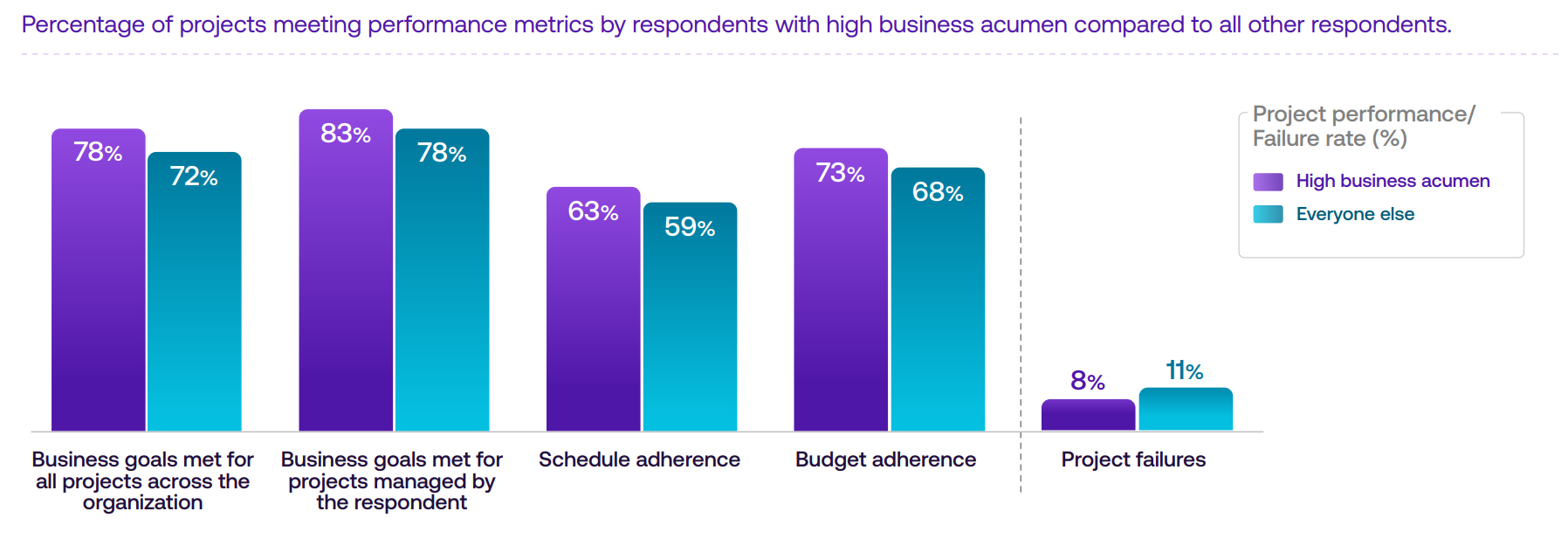
Research shows that only 63% of projects stay on schedule and 73% stay within budget. However, project teams with stronger business acumen achieve better overall results, highlighting the value of planning, training, and business-oriented decision-making.
Your Path to the Right Software Choice
Choosing the right vacation rental software, like Key Data, should be about clarity, alignment, and confidence. When you’ve done the groundwork, your decision will become a calculated step toward efficiency and growth.
Here’s a simple, structured roadmap to guide your next move:
- Audit your current operations and pinpoint your top three pain points where time, revenue, or communication breaks down.
- Define your must-have requirements based on your management model and long-term goals.
- Research and shortlist three to four platforms that align with your operations, budget, and growth plans.
- Conduct focused demos using your real data, challenges, and owner scenarios to see how each system performs under real conditions.
- Test the top choice through a trial or pilot before committing to a long-term contract, ensuring the system truly supports your workflows.
Before evaluating software features, understand your market position. When you know how your properties perform compared to competitors, you can choose the software capabilities that drive revenue growth.